

Good morning, everyone!
I’ve been busy reading and writing, and not had a lot of ideas for what to post here. But I want to keep posting, even when I don’t have any thoughts on writing, book reviews, or want to share my own works. So I’m going to try to share resources, on the days when I don’t know what to blog about.
Recently I wrote a blog post about writing magazines, but let’s face it: we’re in a digital age now, and have been for years. These days, rather than turn to your Writer’s Digest or group discussion to get help outlining your novel, you’re much more likely to turn to a writing program. Most people use them on their desktop computers; I’m sure some use them on their tablets, sync them with their smartphones while listening to music, etc.
Here are some programs out there that are purportedly the best! I can’t say I’ve tried them all. One of these days, I’m giving myself Scrivener for my birthday.
Top 3 Writing Programs – For Editing & More
There’s a lot of things to consider about writing programs: Some help you outline and organize, others give you the ability to do a sortof storyboard of digital post-it notes, and still others help you edit, word by word, your entire novel. Here are some of the big ones:

- Scrivener
I don’t know about you, but when I think about writing programs, I think about Scrivener. Scrivener has been around since 2007, when it was released by Keith Blount. It does take some time to learn how to use it; one couldn’t say it’s the easiest of the writing programs, but it makes up for it in all the things it allows you to do! Scrivener helps you:
- Organize note cards on a virtual corkboard
- Outline your novel in a drag-and-drop style so you can move things around
- Split screen-mode so you can work on multiple projects at once
- Take snapshots
- Export to e-book formats such as EPUB and more
Scrivener is compatible with Windows, Mac, iPads and iPhones! Pretty cool, if you ask me. The one big, blaring con that stands out for people is how long it can take to learn how to use it. One user on Reddit says it’s a 2-hour learning curve if you watch YouTube tutorials, and yet another said Scrivener is bug-y for Windows. Most people seem to find it worth it to learn how to use, and there’s a plethora of tutorials on Scrivener. They’re even shared by the Scrivener developers, Literature & Latte. You can check out reviews here and here that are way more in-depth.
Last but not least, what is the cost, you ask? Currently in 2021, it’s $50 for Mac or Windows, and $20 for iPhones. Find out more about Scrivener and its developers here.
2. ProWritingAid
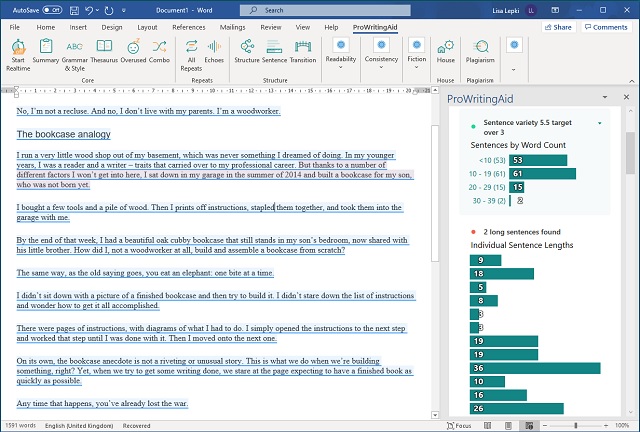
While Google Docs is listed as one of the top writing softwares, since many of us have been using Google, Gmail, etc. for years, I’m not going to include it in this post. Next we’re going to discuss a writing software called Pro-Writing Aid, which is touted as an excellent grammar- and spell-checker that tops the list compared to similar softwares. It’s cheaper than Grammarly (which I’ve gotten SO sick of seeing ads for on YouTube, I’m not even including in this post, either), and less expensive. Let’s get into what it does:
- Grammar and spellcheck
- Highlights poor word choices, bogged-down sentences, etc.
- Assists with past and present tense consistency
- Highlights duplicated words or phrases
Not only that, ProWritingAid syncs up well with Microsoft Word, Google Docs, Scrivener, and most web browsers. You can also just upload documents into its web-editor. There are definitely some cons to ProWritingAid though, including an inability to work with Word on Macs, and it is known to be wrong with pointing out mistakes, sometimes.
The cost of ProWritingAid is $20/month, or $79 a year (Grammarly, for comparison, is $30/month for premium).
3. Evernote
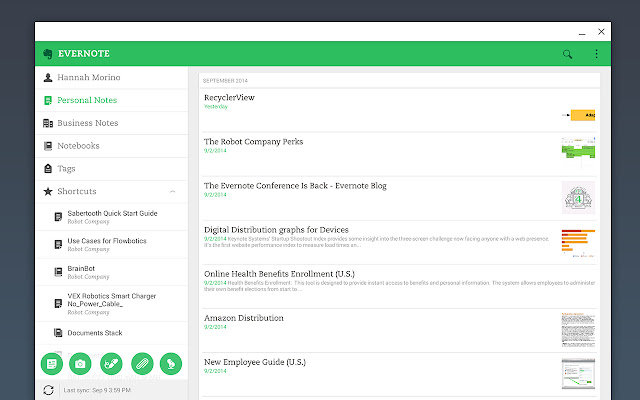
Evernote is a tried-and-true writing software that has been around for a long time. Any of you who use Apple out there, you might recognize it as the default editing program suggested on your Apple device. Some great things about Evernote are how it lets you sync between devices, write on-the-go, and it’s simple in appearance, which is less distracting than the busyness of some other programs.
However, some people find Evernote too default, too boring, and would prefer other programs, such as Ulysses, or Freedom, to Evernote. It also can get clunky if you want to put a whole novel in; it’s much better for just taking notes or doing an outline. The free program, like most free programs, is definitely not preferable to its paid alternative, which is $8/month or $80/year for its Personal, not Professional, version.

Honorable Mentions
The three programs I’ve mentioned here have a variety of uses, from outlining, planning, and writing your novel, to making notes on-the-go or editing your drafts. Along the way, there were a lot of other programs I could have chosen to highlights, but I decided on these three heavy-hitters that you can use all together to hit all the to-dos. Here are some of the programs that I didn’t give time to in this post, but deserve an honorable mention:
- Google Docs – for writing and organizing your book documents, outline, etc.
- Microsoft Word – for writing your book
- Vellum – for e-publishing and formatting
- Freedom – for scheduling writing without distraction
Check out more here, at The Write Practice.
If you have more writing or editing softwares you think should have been mentioned, or would like to share your experiences, please share in the comments! Meanwhile, if I ever do get Scrivener, you bet I’ll be reviewing it here on this blog.
Until next time,
Chaitanya
 Typing Madly